🔗 4-Router RIP + OSPF Network Lab

Complete Configuration · Serial Mesh Topology · ACL Filtering

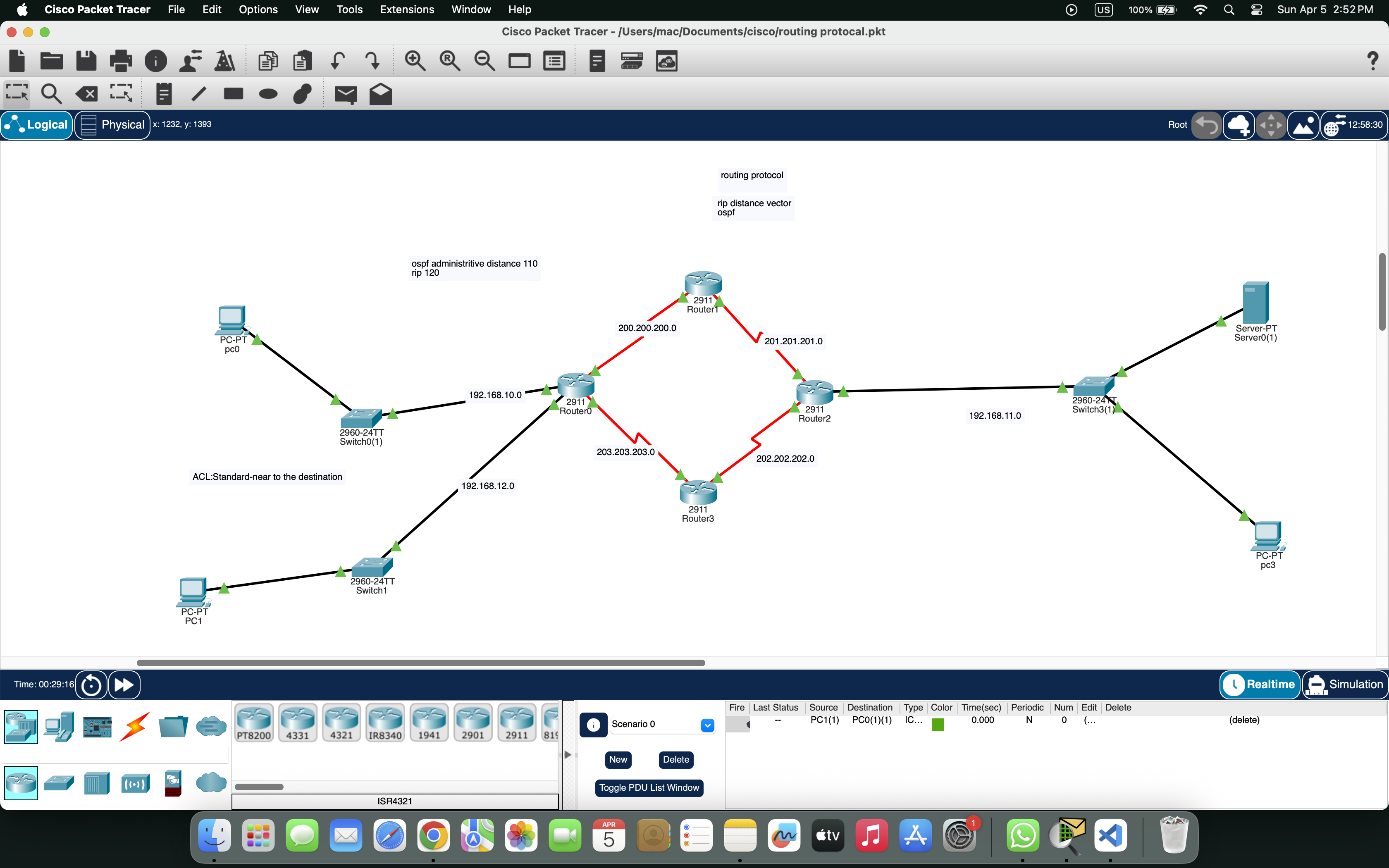
4 Routers | 2 Switches | 3 PCs | 1 Server

📡 Network Topology

🔍 Click to zoom

📄 Packet Tracer File (Complete RIP + OSPF Lab)

4-Router mesh · RIP v2 · OSPF · Serial connections · ACL filtering

⬇ Download RIP_OSPF_Lab.pkt
Routers
4 (R0, R1, R2, R3)
Serial Links
200.200.200.0 · 201.201.201.0 · 202.202.202.0 · 203.203.203.0
LAN Networks
192.168.10.0 · 192.168.11.0 · 192.168.12.0
End Devices
PC0, PC1, PC2, Server0
⏱️ Clock Rate Settings (DCE/DTE)
Serial LinkDCE RouterClock RateDTE RouterClock Rate
R0 Se0/3/0 ↔ R1 Se0/3/0R0 (DCE)128000R1 (DTE)Not set
R1 Se0/3/1 ↔ R2 Se0/3/1R1 (DCE)128000R2 (DTE)Not set
R2 Se0/3/0 ↔ R3 Se0/3/1R2 (DCE)128000R3 (DTE)Not set
R3 Se0/3/0 ↔ R0 Se0/3/1R3 (DCE)128000R0 (DTE)Not set
💡 Only the DCE side needs clock rate. DTE side receives timing from DCE.
🔁 SECTION 1: RIP v2 Configuration (Distance Vector) AD: 120
1 Add Serial Modules to All Routers
Click Router → Physical tab → Power OFF → Drag HWIC-2T → Power ON
Repeat for Router0, Router1, Router2, Router3
2 Connect Serial Cables (Mesh Topology)
Router0 Se0/3/0 ──────── Router1 Se0/3/0 (200.200.200.0/30) Router1 Se0/3/1 ──────── Router2 Se0/3/1 (201.201.201.0/30) Router2 Se0/3/0 ──────── Router3 Se0/3/1 (202.202.202.0/30) Router3 Se0/3/0 ──────── Router0 Se0/3/1 (203.203.203.0/30)
3 Connect Ethernet Cables
PC0 ─── Switch0 Fa0/1 ─── Switch0 Fa0/2 ─── Router0 G0/0 PC1 ─── Switch3 Fa0/1 ─── Switch3 Fa0/2 ─── Router3 G0/0 PC2 ─── Switch3 Fa0/3 ─── Switch3 Fa0/4 ─── Router2 G0/0 Server0 ─── Switch3 Fa0/5
4 Configure Router0 (RIP only)
Router0> enable Router0# configure terminal Router0(config)# hostname R0 R0(config)# interface gigabitEthernet 0/0 R0(config-if)# ip address 192.168.10.1 255.255.255.0 R0(config-if)# no shutdown R0(config-if)# exit R0(config)# interface serial 0/3/0 R0(config-if)# ip address 200.200.200.1 255.255.255.252 R0(config-if)# clock rate 128000 R0(config-if)# no shutdown R0(config-if)# exit R0(config)# interface serial 0/3/1 R0(config-if)# ip address 203.203.203.1 255.255.255.252 R0(config-if)# no shutdown R0(config-if)# exit R0(config)# router rip R0(config-router)# version 2 R0(config-router)# no auto-summary R0(config-router)# network 192.168.10.0 R0(config-router)# network 200.200.200.0 R0(config-router)# network 203.203.203.0 R0(config-router)# end R0# write memory
5 Configure Router1 (RIP only)
Router1> enable Router1# configure terminal Router1(config)# hostname R1 R1(config)# interface serial 0/3/0 R1(config-if)# ip address 200.200.200.2 255.255.255.252 R1(config-if)# no shutdown R1(config-if)# exit R1(config)# interface serial 0/3/1 R1(config-if)# ip address 201.201.201.1 255.255.255.252 R1(config-if)# clock rate 128000 R1(config-if)# no shutdown R1(config-if)# exit R1(config)# router rip R1(config-router)# version 2 R1(config-router)# no auto-summary R1(config-router)# network 200.200.200.0 R1(config-router)# network 201.201.201.0 R1(config-router)# end R1# write memory
6 Configure Router2 (RIP only)
Router2> enable Router2# configure terminal Router2(config)# hostname R2 R2(config)# interface gigabitEthernet 0/0 R2(config-if)# ip address 192.168.11.1 255.255.255.0 R2(config-if)# no shutdown R2(config-if)# exit R2(config)# interface serial 0/3/1 R2(config-if)# ip address 201.201.201.2 255.255.255.252 R2(config-if)# no shutdown R2(config-if)# exit R2(config)# interface serial 0/3/0 R2(config-if)# ip address 202.202.202.1 255.255.255.252 R2(config-if)# clock rate 128000 R2(config-if)# no shutdown R2(config-if)# exit R2(config)# router rip R2(config-router)# version 2 R2(config-router)# no auto-summary R2(config-router)# network 192.168.11.0 R2(config-router)# network 201.201.201.0 R2(config-router)# network 202.202.202.0 R2(config-router)# end R2# write memory
7 Configure Router3 (RIP only)
Router3> enable Router3# configure terminal Router3(config)# hostname R3 R3(config)# interface gigabitEthernet 0/0 R3(config-if)# ip address 192.168.12.1 255.255.255.0 R3(config-if)# no shutdown R3(config-if)# exit R3(config)# interface serial 0/3/1 R3(config-if)# ip address 202.202.202.2 255.255.255.252 R3(config-if)# no shutdown R3(config-if)# exit R3(config)# interface serial 0/3/0 R3(config-if)# ip address 203.203.203.2 255.255.255.252 R3(config-if)# clock rate 128000 R3(config-if)# no shutdown R3(config-if)# exit R3(config)# router rip R3(config-router)# version 2 R3(config-router)# no auto-summary R3(config-router)# network 192.168.12.0 R3(config-router)# network 202.202.202.0 R3(config-router)# network 203.203.203.0 R3(config-router)# end R3# write memory
8 Verify RIP is Working
R0# show ip route rip R0# show ip protocols R2# show ip route rip
✅ RIP should now be exchanging routes between all 4 routers.
SECTION 2: OSPF Configuration (Link State) AD: 110
💡 OSPF (Open Shortest Path First) is a link-state routing protocol. It uses cost as metric and converges faster than RIP.
Now add OSPF on Router0 and Router3 (the edge routers). This creates a hybrid routing environment.
1 Add OSPF to Router0
R0> enable R0# configure terminal R0(config)# router ospf 1 R0(config-router)# network 192.168.10.0 0.0.0.255 area 0 R0(config-router)# network 200.200.200.0 0.0.0.3 area 0 R0(config-router)# network 203.203.203.0 0.0.0.3 area 0 R0(config-router)# exit R0# write memory
2 Add OSPF to Router3
R3> enable R3# configure terminal R3(config)# router ospf 1 R3(config-router)# network 192.168.12.0 0.0.0.255 area 0 R3(config-router)# network 202.202.202.0 0.0.0.3 area 0 R3(config-router)# network 203.203.203.0 0.0.0.3 area 0 R3(config-router)# exit R3# write memory
3 Verify OSPF Neighbors
R0# show ip ospf neighbor R0# show ip route ospf R3# show ip ospf interface
✅ OSPF neighbors should show FULL/DR state between R0 and R3.
🛡️ SECTION 3: ACL Rules & End Device Configuration
1 Configure IP Addresses on PCs & Server
PC0: IP 192.168.10.10 /24 Gateway: 192.168.10.1 PC1: IP 192.168.12.10 /24 Gateway: 192.168.12.1 PC2: IP 192.168.11.10 /24 Gateway: 192.168.11.1 Server0: IP 192.168.12.100 /24 Gateway: 192.168.12.1 (HTTP: On)
2 ACL 101: Block HTTP from 192.168.12.0 to 192.168.11.0, Allow Ping
R3> enable R3# configure terminal R3(config)# access-list 101 deny tcp 192.168.12.0 0.0.0.255 192.168.11.0 0.0.0.255 eq www R3(config)# access-list 101 permit icmp 192.168.12.0 0.0.0.255 192.168.11.0 0.0.0.255 echo R3(config)# access-list 101 permit ip any any R3(config)# interface gigabitEthernet 0/0 R3(config-if)# ip access-group 101 in R3(config-if)# end R3# write memory
🎯 Result: PC1 (192.168.12.10) can PING PC2 (192.168.11.10) but CANNOT browse HTTP.
3 ACL 102: Block Ping from 192.168.10.0 to 192.168.12.0
R0> enable R0# configure terminal R0(config)# access-list 102 deny icmp 192.168.10.0 0.0.0.255 192.168.12.0 0.0.0.255 echo R0(config)# access-list 102 permit ip any any R0(config)# interface gigabitEthernet 0/0 R0(config-if)# ip access-group 102 in R0(config-if)# end R0# write memory
🎯 Result: PC0 (192.168.10.10) CANNOT PING PC1 (192.168.12.10) but can browse HTTP.
4 PC2 (Staff) has Full Access
PC2> ping 192.168.10.10 → Success (Can ping PC0) PC2> ping 192.168.12.10 → Success (Can ping PC1) PC2> browse 192.168.12.100 → Success (Can access Server0 HTTP)
🎯 Result: PC2 has full ping and browse access to all networks.
5 Final Verification Commands
PC0> ping 192.168.12.10 → Request timed out (Blocked by ACL 102) PC0> browse 192.168.12.100 → Success (HTTP works) PC1> ping 192.168.11.10 → Success (ICMP allowed) PC1> browse 192.168.11.10 → Blocked (HTTP denied by ACL 101) PC2> ping 192.168.10.10 → Success (Full access) PC2> browse 192.168.12.100 → Success (Full access)

📊 Complete Connectivity Test Matrix

SourceDestinationTypeResultReason
PC0 (192.168.10.10)PC1 (192.168.12.10)Ping✗ BlockedACL 102 denies ICMP
PC0 (192.168.10.10)Server0 (192.168.12.100)HTTP✓ SuccessNo HTTP blocking rule
PC1 (192.168.12.10)PC2 (192.168.11.10)Ping✓ SuccessICMP permitted by ACL 101
PC1 (192.168.12.10)PC2 (192.168.11.10)HTTP✗ BlockedACL 101 denies HTTP
PC2 (192.168.11.10)PC0 (192.168.10.10)Ping✓ SuccessNo ACL blocking
PC2 (192.168.11.10)PC1 (192.168.12.10)HTTP✓ SuccessNo ACL blocking
PC2 (192.168.11.10)Server0Both✓ SuccessFull access
📋 Complete IP Addressing Summary

Router0: G0/0=192.168.10.1/24 | Se0/3/0=200.200.200.1/30 (clock 128000) | Se0/3/1=203.203.203.1/30 (no clock)
Router1: Se0/3/0=200.200.200.2/30 (no clock) | Se0/3/1=201.201.201.1/30 (clock 128000)
Router2: G0/0=192.168.11.1/24 | Se0/3/1=201.201.201.2/30 (no clock) | Se0/3/0=202.202.202.1/30 (clock 128000)
Router3: G0/0=192.168.12.1/24 | Se0/3/1=202.202.202.2/30 (no clock) | Se0/3/0=203.203.203.2/30 (clock 128000)

PC0: 192.168.10.10/24 | Gateway: 192.168.10.1
PC1: 192.168.12.10/24 | Gateway: 192.168.12.1
PC2: 192.168.11.10/24 | Gateway: 192.168.11.1
Server0: 192.168.12.100/24 | Gateway: 192.168.12.1 | HTTP: ON